
Table of Contents
Android 17 Is Shaping Up to Be Google’s Smartest Update Yet
Google is preparing one of the biggest Android updates in recent years with Android 17. Instead of focusing only on visual changes, the company is adding smarter AI features, stronger security tools, better multitasking, and deeper personalization across the entire Android ecosystem.
Early beta builds and official previews already show that Android 17 is designed to make Android devices feel more intelligent and connected in everyday use.
Gemini AI Is Becoming the Center of Android
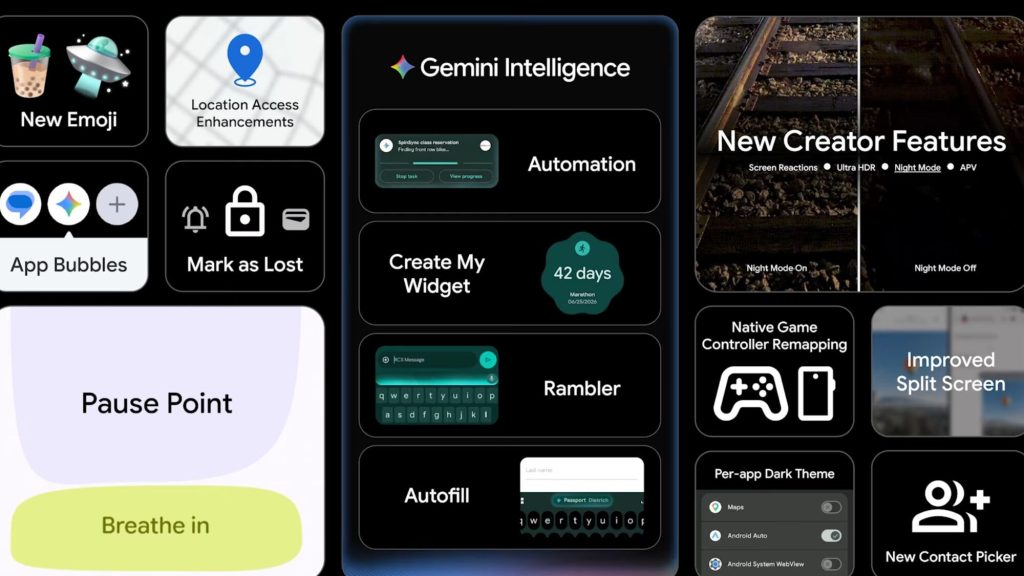
One of the biggest changes in Android 17 is the deeper integration of Gemini AI across the operating system.
Google is introducing several AI-powered features that can help users complete tasks faster and interact with apps more naturally. Android 17 will reportedly support:
- Smarter voice interactions
- AI-powered suggestions
- Cross-app assistance
- Context-aware actions
- Real-time summaries
- Personalized recommendations
Google appears to be turning Gemini into the main AI layer across Android devices.
Android 17 Introduces “Create My Widget”
Google is also working on a new personalization feature called “Create My Widget.”
This feature allows users to generate custom widgets using simple text prompts or voice commands. Instead of manually designing widgets, users can ask Android to create widgets for:
- Weather
- Notes
- Music controls
- Productivity shortcuts
- Smart home controls
- Daily reminders
The feature could become one of Android’s biggest customization upgrades in years.
New Rambler Feature Improves Voice Typing
Android 17 may also include a new tool called “Rambler” designed to improve voice typing.
The feature can reportedly clean up spoken sentences automatically by removing filler words and organizing thoughts into more natural text.
This could make dictation faster and more useful for messaging, emails, and note-taking.
Android 17 Gets a More Modern Design
Google is refreshing Android’s interface with updated Material 3 Expressive design elements.
Users may notice:
- Smoother animations
- Cleaner menus
- Better typography
- Improved multitasking visuals
- Frosted glass effects
- More dynamic color customization
The redesign focuses on making Android feel more fluid and visually modern without changing the overall experience too aggressively.
Security Is Getting a Major Upgrade
Google is also heavily focusing on security in Android 17.
New protections reportedly include:
- AI-powered scam detection
- Better anti-theft tools
- Improved app permission controls
- APK safety scanning
- Device authenticity verification
- Temporary location sharing
Android 17 may also warn users if their software version appears unofficial or potentially unsafe.
New Anti-Theft Features Could Help Protect Devices
Android 17 introduces several new protections designed to make stolen phones harder to use.
Some reported features include:
- Biometric protection during theft mode
- Hidden Quick Settings access
- Stronger remote lock protection
- Disabled unauthorized network changes
These updates are aimed at improving overall smartphone security and reducing theft-related risks.
Better Support for Foldables and Tablets
Google continues improving Android for larger screens and foldable devices.
Android 17 is expected to bring:
- Better split-screen multitasking
- Improved window management
- Smarter app resizing
- Smoother foldable animations
- More responsive layouts
The company appears focused on optimizing Android for future device categories beyond traditional smartphones.
New Features for Content Creators
Android 17 may also introduce several creator-focused tools.
Reports suggest upcoming features could include:
- Better screen recording
- Simultaneous facecam recording
- Improved video tools
- Higher-quality social uploads
- Smarter editing support
These upgrades could help creators produce content more easily directly from Android devices.
Pause Point Feature Aims to Reduce Doomscrolling
Google is reportedly testing a new digital wellbeing feature called “Pause Point.”
The feature briefly interrupts users before opening certain addictive apps or short-video platforms. The goal is to encourage healthier screen habits and reduce endless scrolling behavior.
Android 17 Release Date and Supported Devices
Android 17 is expected to launch officially later this year for Google Pixel devices before expanding to Samsung, Xiaomi, OnePlus, and other Android brands.
Supported Pixel devices are expected to include:
- Pixel 6 series and newer
- Pixel Fold devices
- Pixel Tablet
- Future Pixel models
Several smartphone brands are already testing Android 17 beta versions internally.
Android 17 Could Be a Game Changer
Android 17 looks like a much bigger update than many previous Android releases. Google is clearly moving Android toward a future powered by AI, smarter automation, and better cross-device experiences.
Instead of only adding visual upgrades, Android 17 focuses on improving how users interact with their devices every day. From Gemini AI and advanced security tools to better multitasking and deeper customization, the update could significantly change the Android experience over the next few years.